
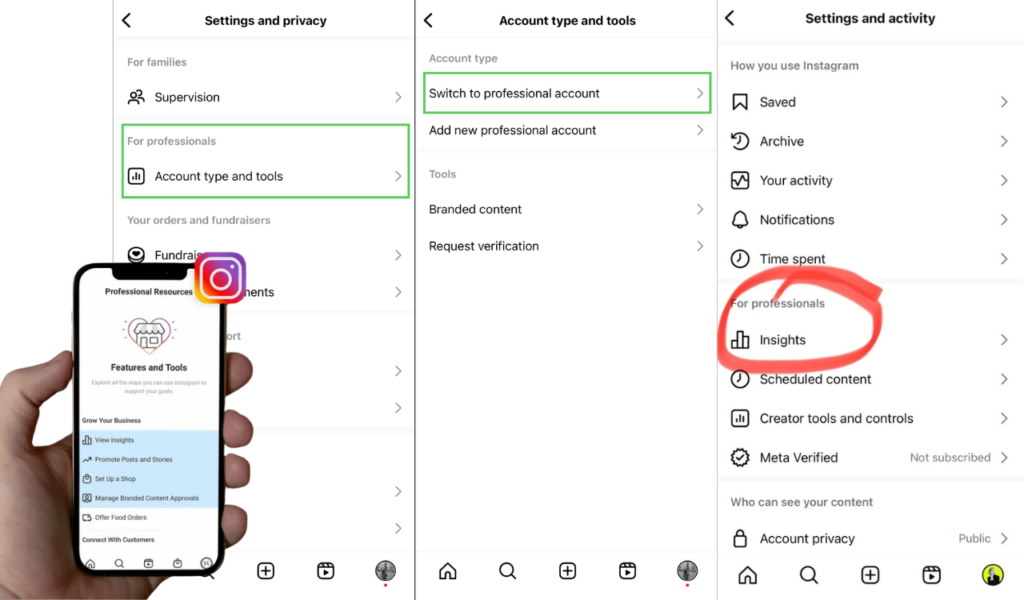
Instagram is easy to use when you understand its setup, insights, and tools. Begin by creating a comprehensive profile that includes a clear photo, a well-written bio, and accurate contact details. Switch to a creator or professional account to unlock helpful features. Instagram Insights provides insights into how your posts perform, who your followers are, and when they are most active. Built-in tools help you schedule content, reply to messages, and track growth. Using reels, stories, and hashtags regularly improves reach. With consistent posting and smart analysis, Instagram becomes a powerful platform for growth.
Instagram Creator Account Setup Guide
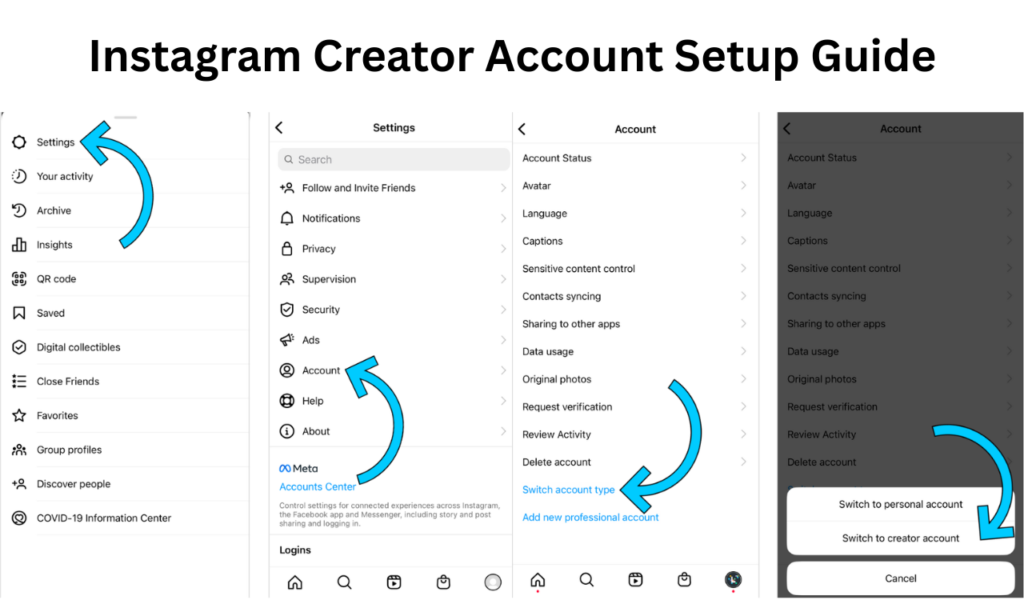
Setting up a creator account involves choosing the right category, enabling insights, and customizing profile settings. After switching, update your bio, add contact options, enable message filters, and review insights regularly.
A well-configured creator account helps track content performance, understand followers, and improve engagement strategies. Many growth-focused platforms like BuyPakistaniFollowers highlight the importance of proper account setup for long-term Instagram success.
How to Analyze Instagram Account Insights
Instagram Insights provides valuable data about your audience and content performance. Available for creator and professional accounts, insights show metrics such as reach, impressions, engagement, follower demographics, and active times.
To access insights, navigate to your profile and tap either “Professional Dashboard” or “Insights. Analyzing this data helps you understand what content works best, improve posting strategies, and grow your account more effectively.
Instagram Account Tools
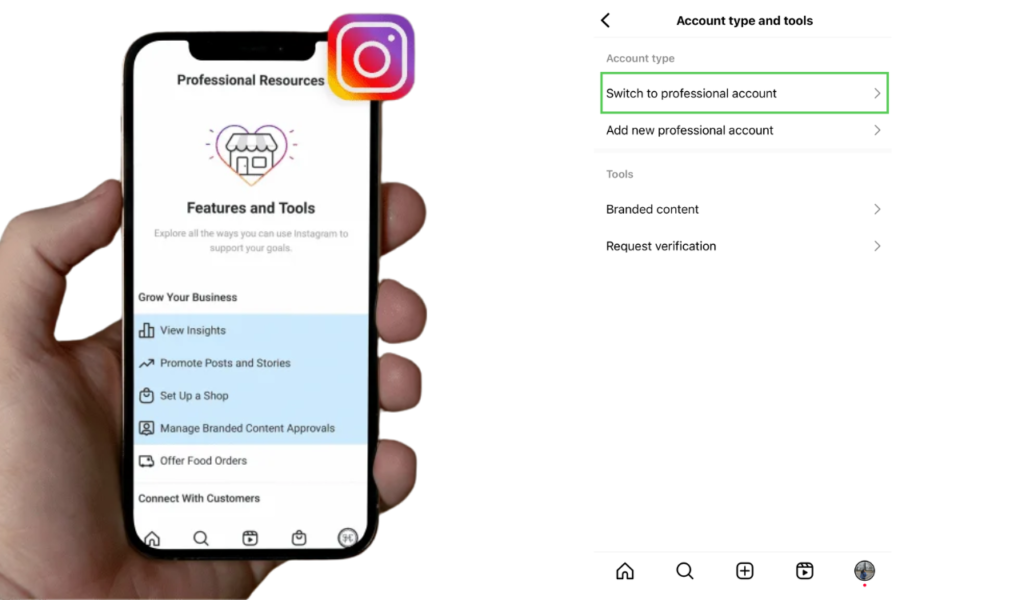
Instagram provides various built-in tools to help users manage content, analyze performance, and engage with audiences. These tools include Insights, Professional Dashboard, Ad Manager access, message filtering, content scheduling, and branded content tools.
Using these tools correctly allows creators and businesses to operate more efficiently and maintain consistent engagement.
View Private Instagram Account Tools
Many users search for tools to view private Instagram accounts, but it’s important to understand that accessing private profiles without permission violates Instagram’s policies. Legitimate tools focus on analytics, content management, and engagement improvement rather than privacy breaches. Always use ethical and approved tools to protect your account and reputation.
Where Are My Account Settings on Instagram
Instagram account settings can be found in the main menu of your profile. Tap your profile picture, select the three-line menu icon, and choose Settings and Privacy. Here, you can manage account security, privacy, notifications, ads, and preferences.
Knowing where these settings are helps you control visibility, manage messages, and customize your Instagram experience.
Privacy and Security Controls
You can control who sees your content, manage blocked accounts, enable two-factor authentication, and manage data permissions.
How to Switch to Instagram Creator Account
Switching to a creator account is ideal for influencers, bloggers, and content creators. To switch, go to Settings, select Account, tap Switch to Professional Account, and choose Creator. Creator accounts offer flexible profile controls, detailed insights, and advanced messaging options.
This account type helps creators manage audience interactions while tracking performance effectively.
How to Switch to Instagram Professional Account
Instagram professional accounts are designed for businesses and brands. To switch, open Settings, tap Account, choose Switch to Professional Account, and select Business. This unlocks features like contact buttons, ad access, and advanced analytics.
Professional accounts are essential for businesses seeking to increase visibility and execute targeted campaigns.
Benefits
Instagram offers multiple benefits for individuals and businesses alike. Its visual format, advanced tools, and large user base make it a powerful platform for communication and marketing.
Benefits of Instagram Ads
Instagram ads help businesses reach targeted audiences based on interests, behavior, and location. Ads increase brand visibility, drive website traffic, and generate leads. With proper targeting and creative content, Instagram advertising delivers measurable results.
Benefits of Instagram Reels
Instagram Reels offer high visibility and reach, making them one of the best tools for organic growth. Short, engaging videos help creators and brands attract new audiences, increase engagement, and stay relevant with trending content.
Benefits of Instagram for Business
Businesses benefit from Instagram through brand awareness, customer engagement, and direct sales. Features like shopping tags, ads, insights, and messaging tools make Instagram a complete marketing platform for businesses of all sizes.
Benefits of Instagram Stories
Instagram Stories allow real-time engagement with followers through polls, questions, links, and stickers. Stories help maintain visibility, promote offers, and build stronger connections with audiences through interactive content.
Benefits of Facebook and Instagram Integration
Account integration improves advertising performance, provides unified analytics, and allows better control of business assets through Meta Business Suite.
Conclusion
Instagram is a powerful platform that offers extensive features for personal users, creators, and businesses alike. By setting up your account correctly, using insights to understand audience behavior, and leveraging built-in tools, you can improve engagement and achieve consistent growth. From privacy controls and content customization to professional accounts and advertising options, Instagram provides everything needed to build a strong online presence, connect with the right audience, and succeed in today’s digital landscape.