
Facebook is widely used for staying connected, promoting businesses, and sharing content with friends and audiences worldwide. However, many users choose to leave the platform for privacy concerns, better focus, or personal reasons. Understanding how to manage your account properly is essential, whether you plan to delete it, deactivate it temporarily, or update important settings. This guide explains everything in clear and simple words, covering account deletion, page management, privacy tools, security options, and common questions users often ask for better control.
How to delete Facebook account permanently
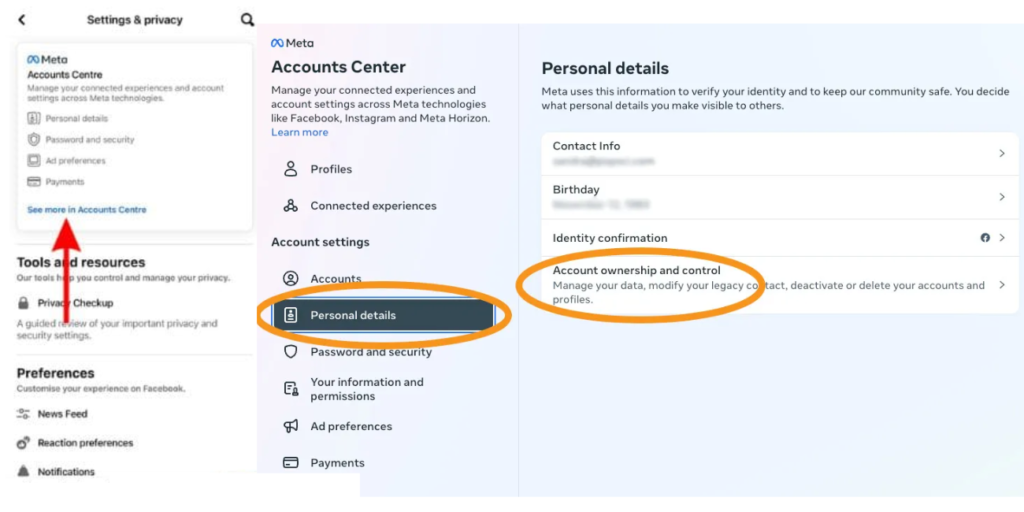
If you want to leave Facebook forever, permanent deletion is the right option. When you delete your account permanently, all your data, photos, posts, and messages are removed. To do this, open Facebook settings, go to Your Facebook Information, and choose Deactivation and Deletion. Select Delete Account and follow the steps. Facebook gives a short grace period before final deletion. If you log in during that time, the deletion process is canceled. Once deleted, your account cannot be recovered.
How to deactivate Facebook account
Deactivation is a temporary option. Your profile becomes invisible, but your data stays safe. To deactivate, go to Settings, then Your Facebook Information, and choose Deactivation and Deletion. Select Deactivate Account and confirm. This option is useful if you want a break without losing your information.
How to delete Facebook page
Deleting a Facebook page is different from deleting a personal account. Go to the page settings, find General, and click Remove Page. Confirm your choice. The page will be unpublished immediately and permanently deleted after a short waiting period. If you change your mind, you can restore it during that time.
How to download video from Facebook
Many users want to save videos for offline viewing. Facebook does not offer a direct download option for most videos. You can use trusted third-party tools or browser extensions to download public videos. Always make sure the video is not private and respect copyright rules. Download videos only for personal use and avoid sharing content without permission.
How to lock Facebook profile
Locking your profile is a great privacy feature. When you lock your profile, only friends can see your full posts and photos. To lock your profile, go to your profile page, tap the three dots, and select Lock Profile. This feature helps protect your content from strangers and adds an extra layer of privacy.
How to change Facebook page name
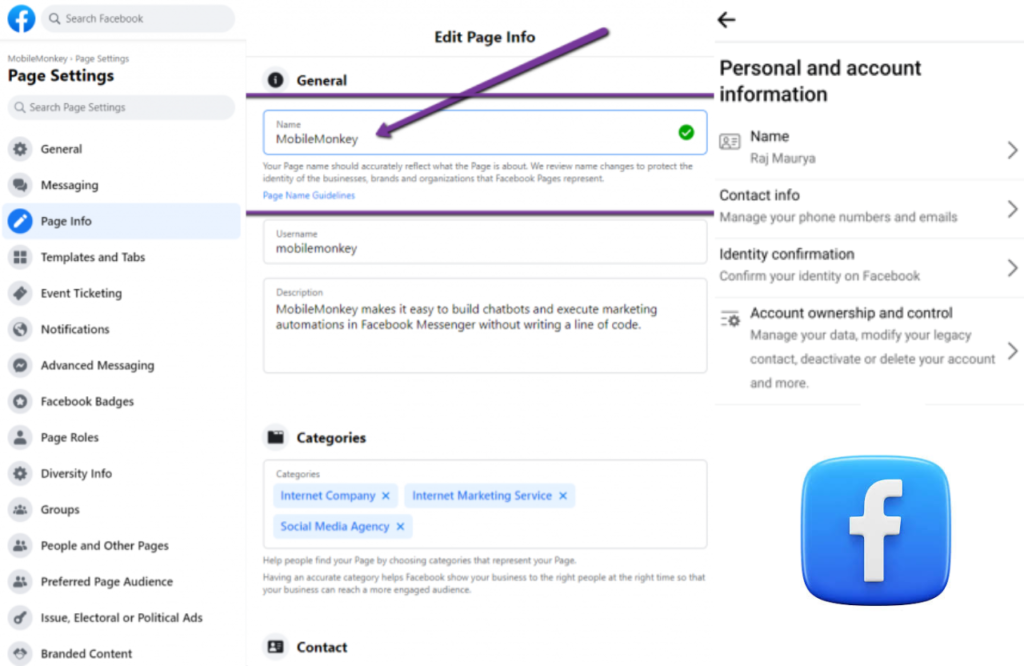
Sometimes businesses rebrand or update their identity, which requires a page name change. To change your page name, go to Page Settings, select General, and click Name. Enter the new name and submit it for review. Facebook may take some time to approve the change. Make sure the new name follows Facebook guidelines.
How to change nickname on Facebook
To change your personal name, go to Settings, then Personal Information, and select nickname. Enter your new name and save changes. Facebook may ask for identity verification in some cases. Name changes are limited, so choose carefully.
Conclusion
Managing your Facebook account properly helps you stay in control of your online presence. Whether you want to delete your account permanently, deactivate it temporarily, manage pages, or improve privacy, Facebook offers many tools to support users. Avoid illegal activities like hacking and focus instead on security and safe usage. Many users who grow pages or manage social media also explore trusted platforms such as BuyPakistanIfollowers to better understand engagement and digital growth strategies. Making informed decisions ensures a safer and smoother social media experience.
FAQs
How to delete a campaign in a disabled Facebook ad account
If your ad account is disabled, you cannot delete campaigns directly. You must first request a review from Facebook. Once access is restored, you can pause or delete campaigns from Ads Manager.
How to delete my Facebook account permanently
Open Settings, go to Your Facebook Information, then choose Deactivation and Deletion. Select Delete Account and confirm the action. Avoid logging in again during the deletion period, as this will cancel the process.
How to delete your Gmail account from Facebook
Open Facebook settings, go to Accounts Center or Personal Information, and update your contact details. Remove the Gmail address and add a new email if needed, then save changes.